🗓️ Easy Booking Calendar
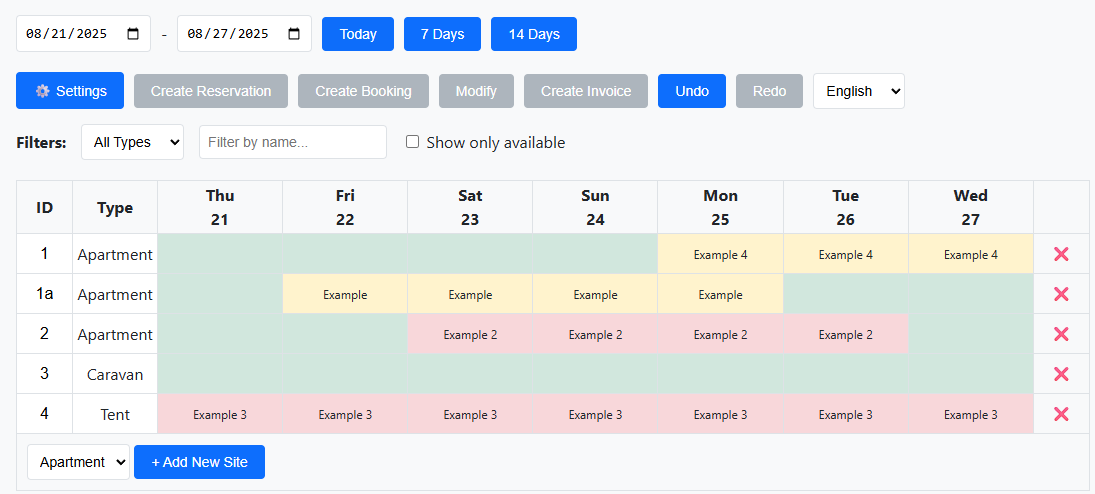
Select dates, see availability at a glance, and avoid double bookings across tents, caravans, and apartments.
Campcruisers Manager
Running a campsite shouldn’t mean juggling paper calendars and crossed‑out notes. Our tool gives you a clear, digital overview of all your reservations—without the learning curve.
No credit card required • Works in English, German, Spanish, French, Italian
Designed for non‑digital natives. If you can read a calendar and fill in a name, you can use this tool.
Select dates, see availability at a glance, and avoid double bookings across tents, caravans, and apartments.
Add adults, kids, dogs, and extras (like firewood or breakfast) with a single click.
Set per‑night and per‑person prices. Seasonal pricing applies automatically. Generate a neat invoice instantly.
Define site types (tent, caravan, pod), offer extras, and tune visitor tax to match your rules.
Switch between English, Deutsch, Español, Français, Italiano—ideal for international guests and teams.
Made a mistake? One click to revert. Your calendar stays clean and accurate.
Keep the simplicity of your wall calendar, add the power of a computer. No training needed.
Do I need training to use it?
No. If you can read a calendar and enter a name, you’re set. The tool feels like paper—but smarter.
Can it handle seasonal pricing?
Yes. Set your seasons and the prices update automatically on the calendar and invoice.
What languages are supported?
English, German, Spanish, French, and Italian. Switch anytime.
Can I undo a mistake?
Absolutely. Undo / Redo is built in, so you can try things without worry.